B2B SaaS
Full revamp
Product Design
Two Systems. One Platform
Unifying a restaurant POS and a separate manager analytics dashboard into one platform.
ROLE
Product Designer
TIMELINE
Sep - Oct 2023・5 weeks
SCOPE
Design only. POS interface and manager analytics dashboard
STACK (FIXED)
Windows-first・Angular・ Clover payments
THE PROBLEM
Two disconnected tools with nothing in common: separate builds, separate interfaces, separate mental models.
MY ROLE
Sole designer. End-to-end on both surfaces, from sketch to sign-off, working from a client requirements document.
THE SOLUTION
A unified interface handling the full service workflow in one screen, with a separate manager analytics view. One platform, two role-aware surfaces.
THE CONSTRAINT
No research access and a fixed stack. Both were decided before I started, so discovery had to come from what I could observe.
01 - OVERVIEW
A real brief, a fixed stack, and a mess to clean up
tapin Platforms had an existing system and a clear verdict: it wasn't working. The POS was a dense, dark-themed interface packed with colour-coded buttons and text-heavy lists built for function, not for people.
I came in through Halobyte as the sole designer for both: the front-of-house POS that waitstaff use to take orders and process payments, and the back-of-house dashboard that managers use to track performance. Two separate tools that had never been designed to belong together. They needed to feel like one product. They didn't.
User problem
Switching tools to answer a basic question mid-service
High cognitive load during peak hours
No shared language between the two tools
Long ramp-up for new staff
Business problem
Slower table turnover from system friction
Rising training cost per hire
Near-zero real-time performance visibility
No shared design language across tools
Constraints, fixed from day one
Windows-first
Angular
Clover payments
Cash drawer
Receipt printer
Password-protected admin
No user research in scope
02 - RESEARCH & DISCOVERY
Research wasn't in scope. I went and found the nearest thing to it.
The contract didn't include user research. It included a requirements document. A document tells you what a client believes; it doesn't tell you what happens at a terminal when there's a queue.
So I built discovery from what I could actually get at: the system they already had, the closest observable analogue I could reach, and the conventions this category has already settled on. Three inputs, each with a different blind spot.
Expand each for what it could and couldn't tell me.
01
Heuristic audit of the live system
02
Proxy observation, self checkout terminals
03
Pattern analysis across POS interfaces
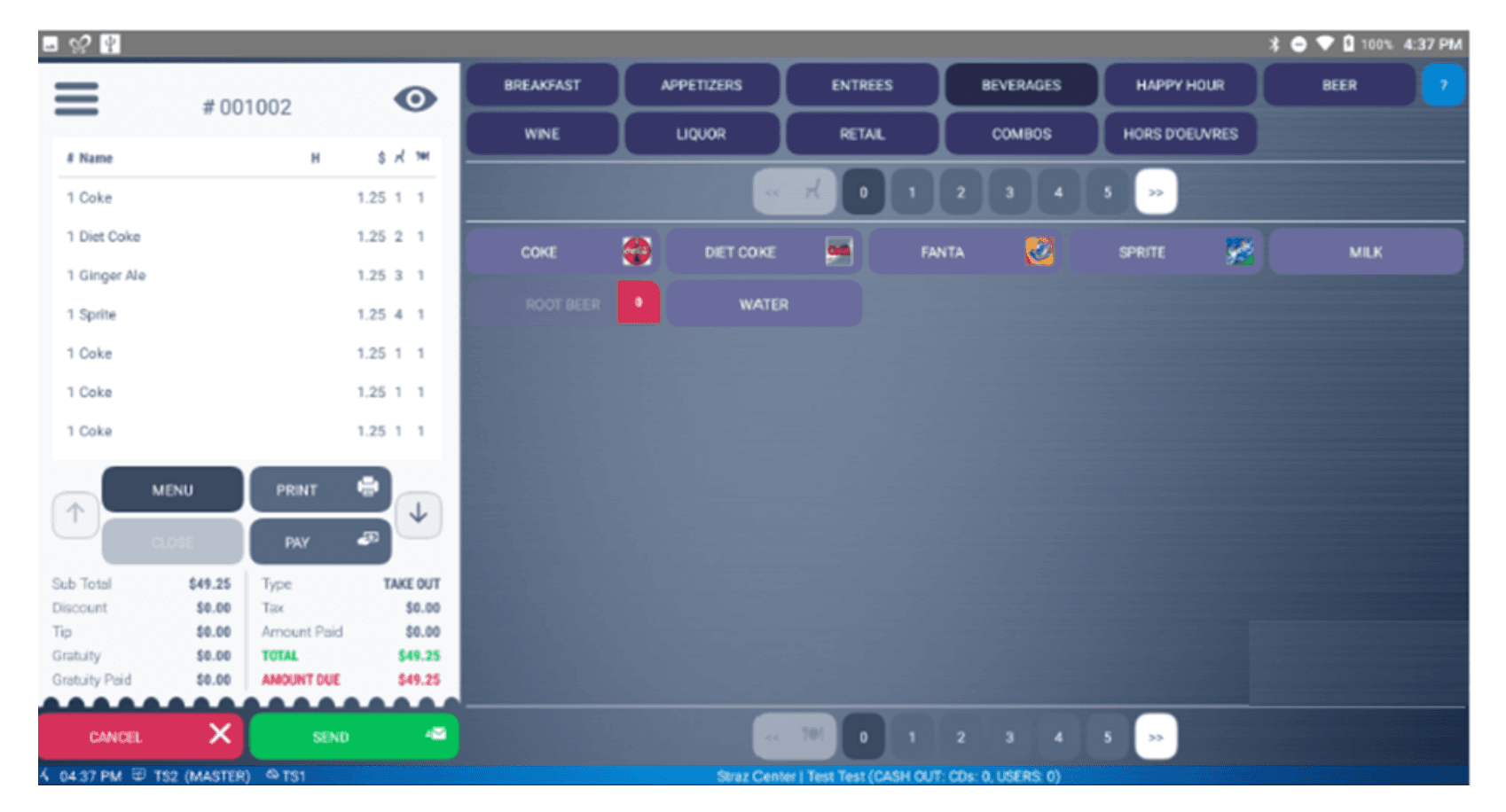
Existing POS
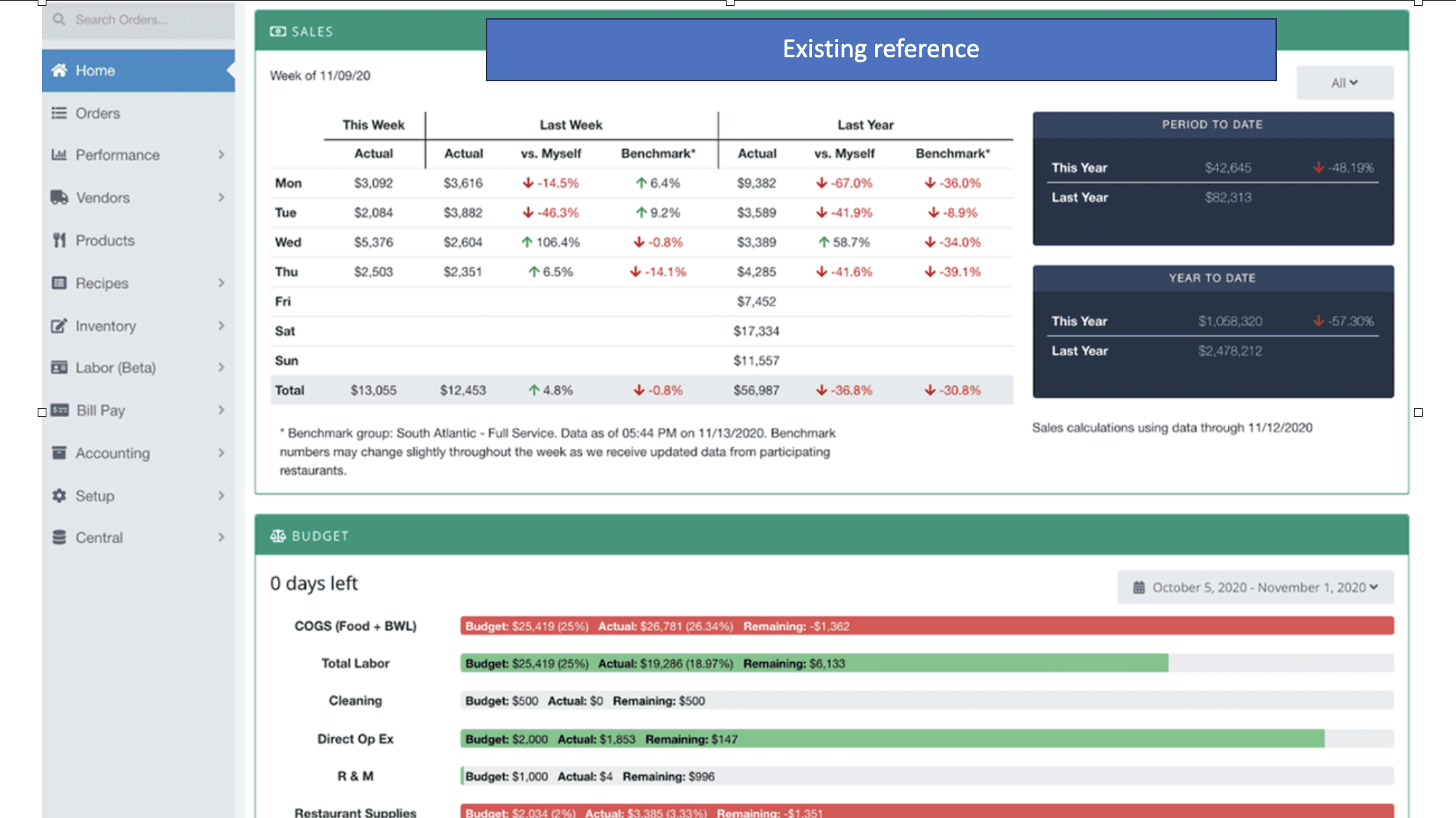
Existing dashboard
The system I was replacing
No visual hierarchy
Buttons, lists, totals, and navigation all competed at the same visual weight. Nothing told the eye where to start.
Mixed order flow
Input, confirmation, and payment were crammed into the same panel with no clear separation between stages.
Spreadsheet analytics
Performance data arrived as raw numbers with no structure, meaningful only to someone who already knew what they were looking at.
How might we...
"design a unified POS that carries the full service workflow, from order to payment to analytics, without adding cognitive load for staff who are already under pressure?"
03 - IDEATION
The structure came first. The details followed
I started on paper. That sketch is still the most useful thing I produced on this project, not because I got it right the first time, but because the structure it established survived everything that came after: item selection in one column, a persistent live order in the other, neither ever hiding the other.
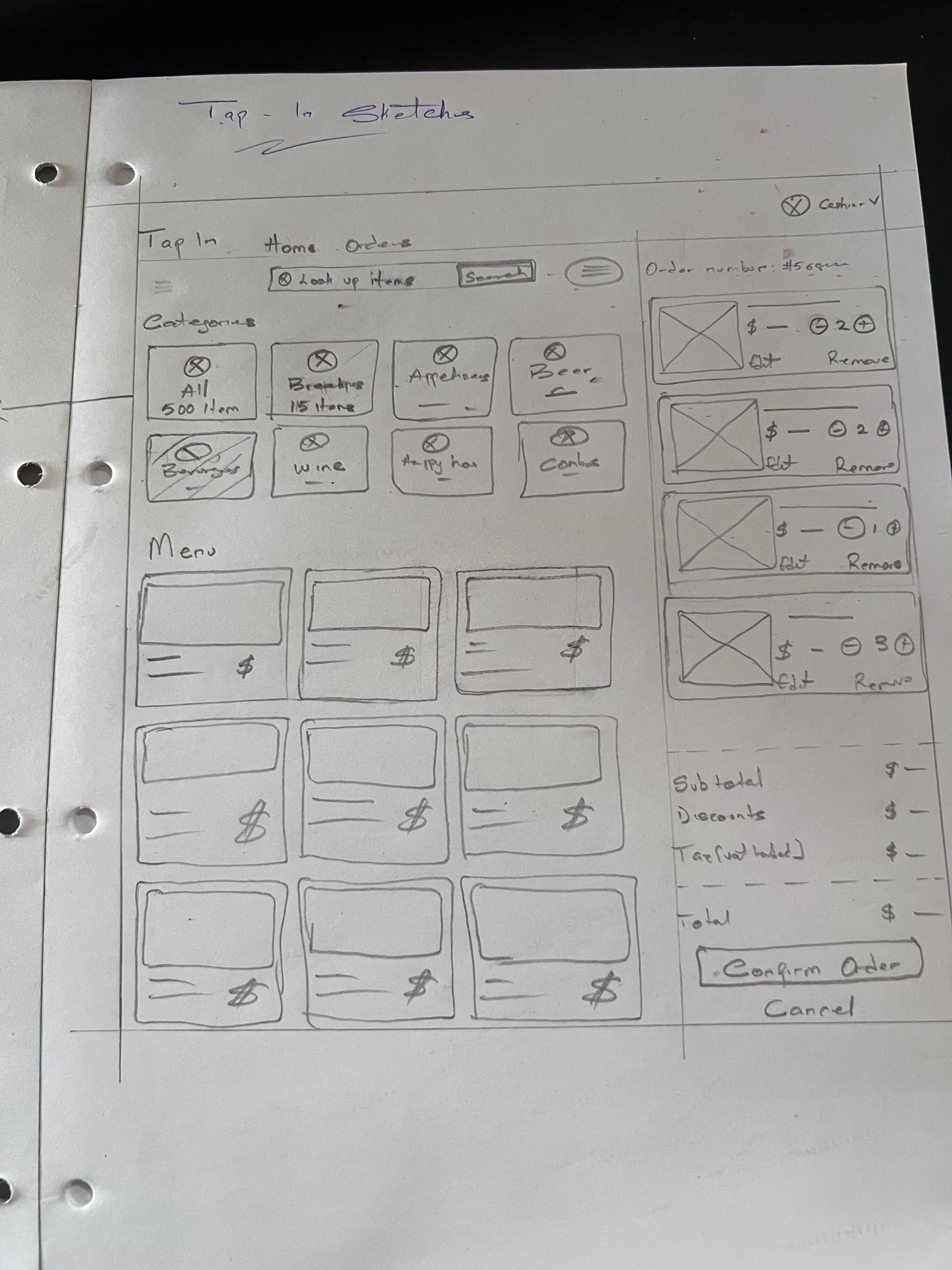
Day 1 sketch - categories, menu grid, live order summary. This structure held; the sides swapped before the final design.
The layout wasn't instinct; it was the most direct answer to the problem. Staff needed everything in one view, with no reason to navigate away from an active order. Once that structure was locked, iteration focused on the details that matter under real service conditions.
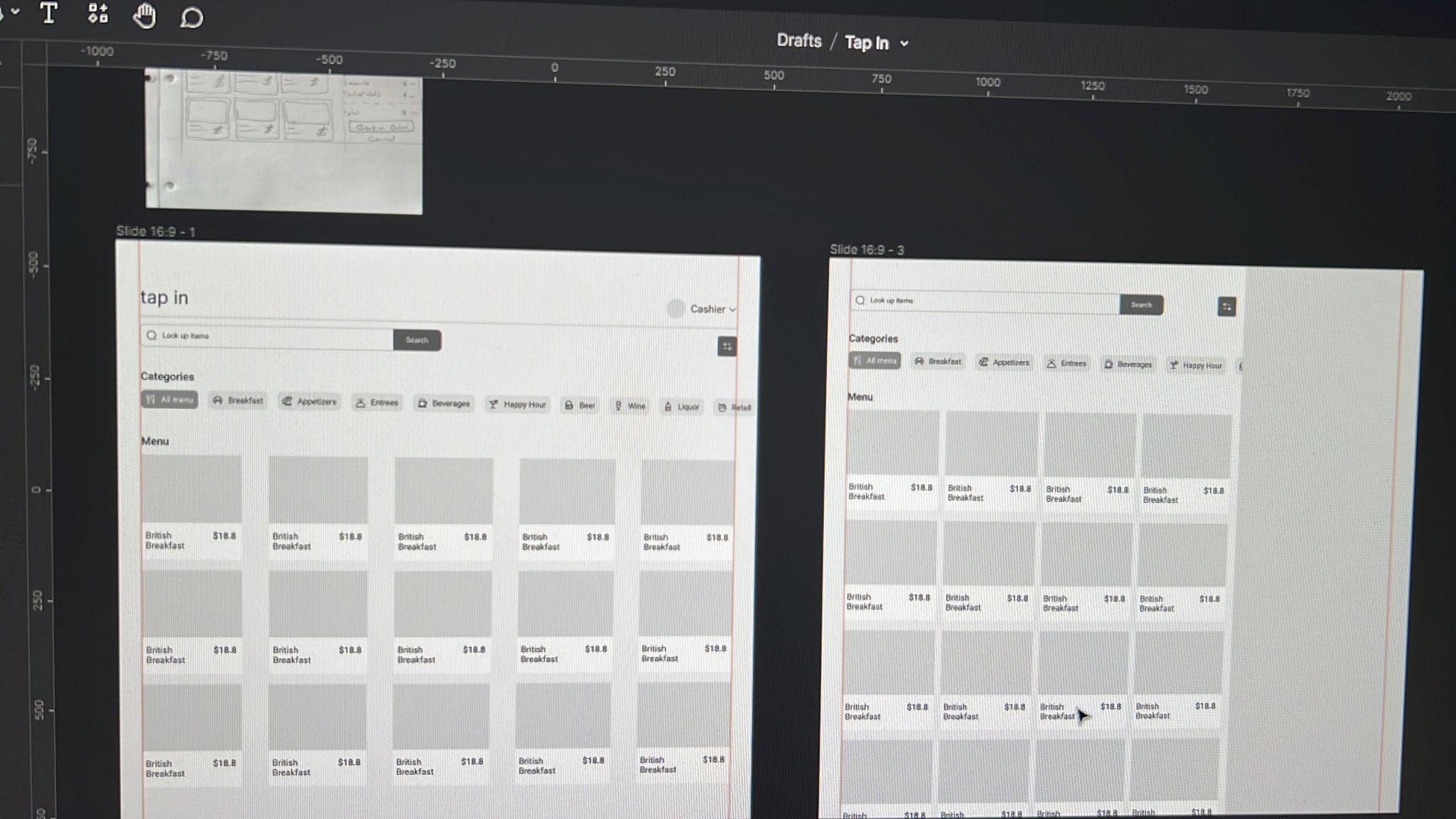
Sketch to wireframes
04 - SOLUTION
One product. Two role-aware surfaces.
The final design brought two disconnected tools into one product with two role-aware surfaces. Every decision traced back to one question: what does this user need right now, and what can wait?
The POS - built for speed under pressure

Visual menu grid, category tabs with item counts, live order summary
The menu grid leads with food photography and clear pricing. Category tabs with item counts let staff navigate without browsing. Adding, customising, and removing items all happen in one view, with the order summary updating in real time throughout.
The admin layer is password-protected as specified, allowing operators to manage menu items without touching the codebase. That single requirement shaped the entire information architecture.

Modal overlay - modify an item without leaving the active order
The Dashboard - built for clarity, not completeness

Year-to-Date, Period to Date, benchmark comparison - direct access to inventory, payroll, and reports
The analytics surface was rebuilt around one question: what does a manager actually need to see? Year-to-date and period-to-date revenue, a benchmark against comparable restaurants, and direct access to reports, inventory, and payroll, all from the same sidebar. No nested windows.
05 - HANDOVER
What engineering received
The redesign was built and delivered for build. What I handed over wasn't a stack of screens, it was a system: two role-aware surfaces plus a reusable component library in Figma spanning both, so engineers assembled from shared parts rather than interpreting a spec per screen.
That was a deliberate call. With a fixed Angular front end and a delivery window that didn't allow a long handover cycle, components travel better than annotations. Build the parts once, and the surfaces stay consistent even where I wasn't in the room to defend a decision.
Two surfaces
POS and manager dashboard as one platform. Role-gated access, so each surface shows only what that role should see.
One component library
Shared building blocks across both surfaces, grid cards, category tabs, order rows, the customisation overlay, dashboard tables.
Built to the stack
Windows-first layouts, Clover payment flow, cash drawer and receipt printer states, password-protected admin layer.


Prototype walkthrough, browsing the menu grid at service speed
06 - REFLECTIONS & NEXT STEPS
What I'd do differently, and where this goes
01
What watching one waiter would have settled
Take column order. I put selection on the left, following self-checkout terminals. The client asked to swap it, following the system their staff already used. Both readings are sound, and only watching someone work decides between them. The model I designed is logical; whether it's instinctive at eight on a Friday is a different question.
02
The structure held because the thinking came first
The structure sketched on day one, selection in one column, a persistent live order in the other, reached the final design intact. The columns swapped sides along the way, but the underlying model never needed rethinking. That's what happens when you spend the first hours mapping workflows before opening a design tool: the time you don't spend redoing the structure is time you spend getting the arrangement and the details right.
03
I benchmarked patterns when I should have benchmarked products
Clover was already in my tech stack, and Clover ships a POS. So do Square, Toast and Lightspeed. Studying design patterns told me what the category has converged on; auditing those shipped products would have told me which conventions survive contact with a real service shift. That's the discovery step I'd add.
Next steps, if this project had a second chapter
Usability testing
Specifically, the customisation modal and order flow speed, with actual front-of-house staff, during a real service shift.
Expanded payment integrations
Additional processors beyond Clover, and connections to delivery platforms and accounting software.
Multi-location reporting
The dashboard gestures at multi-location comparison. A full build-out for operators running more than one site.
Mobile / tableside ordering
The brief specified Windows-first. A handheld version for tableside ordering is the natural next surface.